ℕ𝕠𝕥𝕖𝕤𝔸𝕦𝕣𝕒
𝒞𝑜𝓂𝓅𝓁𝑒𝓉𝑒 ℒ𝑒𝒶𝓇𝓃𝒾𝓃𝑔 𝒲𝒾𝓉𝒽 𝒰𝓈...
𝒞𝑜𝓂𝓅𝓁𝑒𝓉𝑒 ℒ𝑒𝒶𝓇𝓃𝒾𝓃𝑔 𝒲𝒾𝓉𝒽 𝒰𝓈...
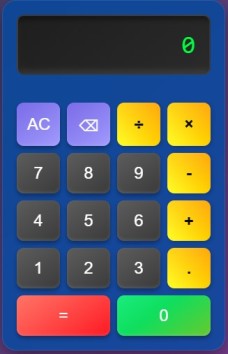
This project is a Modern Calculator built using HTML, CSS, and JavaScript. It features a sleek and responsive design with a digital display, support for basic arithmetic operations, and animations for a modern user experience. The calculator is designed to work seamlessly on both desktop and mobile devices.
calculator-project.index.html - For the HTML structure.styles.css - For styling the calculator.script.js - For handling calculator logic.index.html, create the basic structure of the calculator using HTML.styles.css, style the calculator to make it visually appealing.script.js, write functions to handle button clicks, perform calculations, and update the display.
<!DOCTYPE html>
<html lang="en">
<head>
  <meta charset="UTF-8">
  <meta name="viewport" content="width=device-width, initial-scale=1.0">
  <title>Modern Calculator</title>
  <link rel="stylesheet" href="styles.css">
  <link href="https://fonts.googleapis.com/css2?family=Digital-7&display=swap" rel="stylesheet">
</head>
<body>
  <div class="calculator">
    <div class="display">
      <input type="text" id="display" value="0" readonly>
    </div>
    <div class="buttons">
      <button class="button" onclick="clearDisplay()">AC</button>
      <button class="button" onclick="backspace()">⌫</button>
      <button class="button" onclick="appendToDisplay('/')">÷</button>
      <button class="button" onclick="appendToDisplay('*')">×</button>
      <button class="button" onclick="appendToDisplay('7')">7</button>
      <button class="button" onclick="appendToDisplay('8')">8</button>
      <button class="button" onclick="appendToDisplay('9')">9</button>
      <button class="button" onclick="appendToDisplay('-')">-</button>
      <button class="button" onclick="appendToDisplay('4')">4</button>
      <button class="button" onclick="appendToDisplay('5')">5</button>
      <button class="button" onclick="appendToDisplay('6')">6</button>
      <button class="button" onclick="appendToDisplay('+')">+</button>
      <button class="button" onclick="appendToDisplay('1')">1</button>
      <button class="button" onclick="appendToDisplay('2')">2</button>
      <button class="button" onclick="appendToDisplay('3')">3</button>
      <button class="button" onclick="appendToDisplay('.')">.</button>
      <button class="button equals" onclick="calculateResult()">=</button>
      <button class="button zero" onclick="appendToDisplay('0')">0</button>
    </div>
  </div>
  <script src="script.js"></script>
</body>
</html>
* {
  margin: 0;
  padding: 0;
  box-sizing: border-box;
}

body {
  margin: 0;
  padding: 0;
  display: flex;
  justify-content: center;
  align-items: center;
  min-height: 100vh;
  font-family: 'Segoe UI', Tahoma, Geneva, Verdana, sans-serif;
  background: linear-gradient(135deg, #2c3e50, #8e44ad);
  background-size: cover;
  color: white;
  user-select: none;
  overflow: hidden;
}

.calculator {
  background: rgba(13, 71, 161, 0.8);
  border-radius: 20px;
  box-shadow: 0 10px 30px rgba(0, 0, 0, 0.5);
  overflow: hidden;
  width: 90%;
  max-width: 320px;
  backdrop-filter: blur(10px);
  border: 1px solid rgba(255, 255, 255, 0.1);
  margin: 20px;
}

.display {
  background: linear-gradient(145deg, #1e1e1e, #2a2a2a);
  color: #00ff00;
  font-size: 36px;
  font-family: 'Digital-7', monospace;
  padding: 20px;
  text-align: right;
  border: 2px solid rgba(255, 255, 255, 0.1);
  border-radius: 10px;
  margin: 20px;
  box-shadow: inset 0 4px 8px rgba(0, 0, 0, 0.5), inset 0 -4px 8px rgba(255, 255, 255, 0.1);
  overflow: hidden;
  white-space: nowrap;
  position: relative;
}

.display input {
  background: transparent;
  border: none;
  color: #00ff00;
  font-size: 36px;
  font-family: 'Digital-7', monospace;
  width: 100%;
  text-align: right;
  outline: none;
  caret-color: #00ff00;
  animation: slideIn 0.3s ease-in-out;
}

@keyframes slideIn {
  0% {
      transform: translateX(10px);
      opacity: 0.5;
  }
  100% {
      transform: translateX(0);
      opacity: 1;
  }
}

.animate {
  display: inline-block;
  animation: slideIn 0.3s ease-in-out;
}

.buttons {
  display: grid;
  grid-template-columns: repeat(4, 1fr);
  grid-gap: 10px;
  padding: 20px;
}

.button {
  background: linear-gradient(145deg, #4a4a4a, #3a3a3a);
  color: #fff;
  font-size: 24px;
  font-family: 'Arial', sans-serif;
  border: none;
  border-radius: 10px;
  padding: 15px;
  cursor: pointer;
  transition: all 0.3s ease;
  box-shadow: 0 4px 6px rgba(0, 0, 0, 0.3), inset 0 -2px 4px rgba(255, 255, 255, 0.1);
  position: relative;
  overflow: hidden;
}

.button::before {
  content: '';
  position: absolute;
  top: 0;
  left: 0;
  width: 100%;
  height: 100%;
  background: linear-gradient(145deg, rgba(255, 255, 255, 0.1), rgba(255, 255, 255, 0));
  border-radius: 10px;
  z-index: 1;
}

.button:hover {
  transform: translateY(-2px);
  box-shadow: 0 6px 12px rgba(0, 0, 0, 0.4), inset 0 -2px 4px rgba(255, 255, 255, 0.1);
}

.button:active {
  transform: translateY(0);
  box-shadow: 0 2px 4px rgba(0, 0, 0, 0.3), inset 0 2px 4px rgba(0, 0, 0, 0.2);
}

.button:focus {
  outline: none;
}

.button[onclick="calculateResult()"] {
  background: linear-gradient(145deg, #ff6f61, #ff3b3f);
  grid-column: span 2;
}

.button[onclick="calculateResult()"]:hover {
  background: linear-gradient(145deg, #ff3b3f, #ff6f61);
}

.button[onclick="clearDisplay()"],
.button[onclick="backspace()"] {
  background: linear-gradient(145deg, #6c5ce7, #a29bfe);
}

.button[onclick="clearDisplay()"]:hover,
.button[onclick="backspace()"]:hover {
  background: linear-gradient(145deg, #a29bfe, #6c5ce7);
}

.button.zero {
  grid-column: span 2;
  background: linear-gradient(145deg, #5ce763, #82c714);
}

.button:nth-child(3),
.button:nth-child(4),
.button:nth-child(8),
.button:nth-child(12),
.button:nth-child(16) {
  background: linear-gradient(45deg, yellow, orange);
  color: black;
  font-weight: bold;
  border: none;
  box-shadow: 2px 2px 5px rgba(0, 0, 0, 0.2);
  transition: all 0.3s ease;
}

.button:nth-child(3):hover,
.button:nth-child(4):hover,
.button:nth-child(8):hover,
.button:nth-child(12):hover,
.button:nth-child(16):hover {
  background: linear-gradient(45deg, orange, yellow);
  transform: scale(1.1);
}

@media (max-width: 480px) {
  .calculator {
    width: 100%;
    border-radius: 0;
    margin: 0;
  }

  .display {
    font-size: 28px;
    padding: 15px;
    margin: 10px;
  }

  .buttons {
    grid-gap: 5px;
    padding: 10px;
  }

  .button {
    font-size: 20px;
    padding: 10px;
  }
}
function appendToDisplay(value) {
  const display = document.getElementById("display");
  if (display.value === "0" && value !== ".") {
    display.value = value;
  } else {
    display.value += value;
  }
}

function clearDisplay() {
  document.getElementById("display").value = "0";
}

function backspace() {
  const display = document.getElementById("display");
  display.value = display.value.slice(0, -1) || "0";
}

function calculateResult() {
  const display = document.getElementById("display");
  try {
    display.value = eval(display.value);
  } catch (e) {
    display.value = "Error";
  }
}